
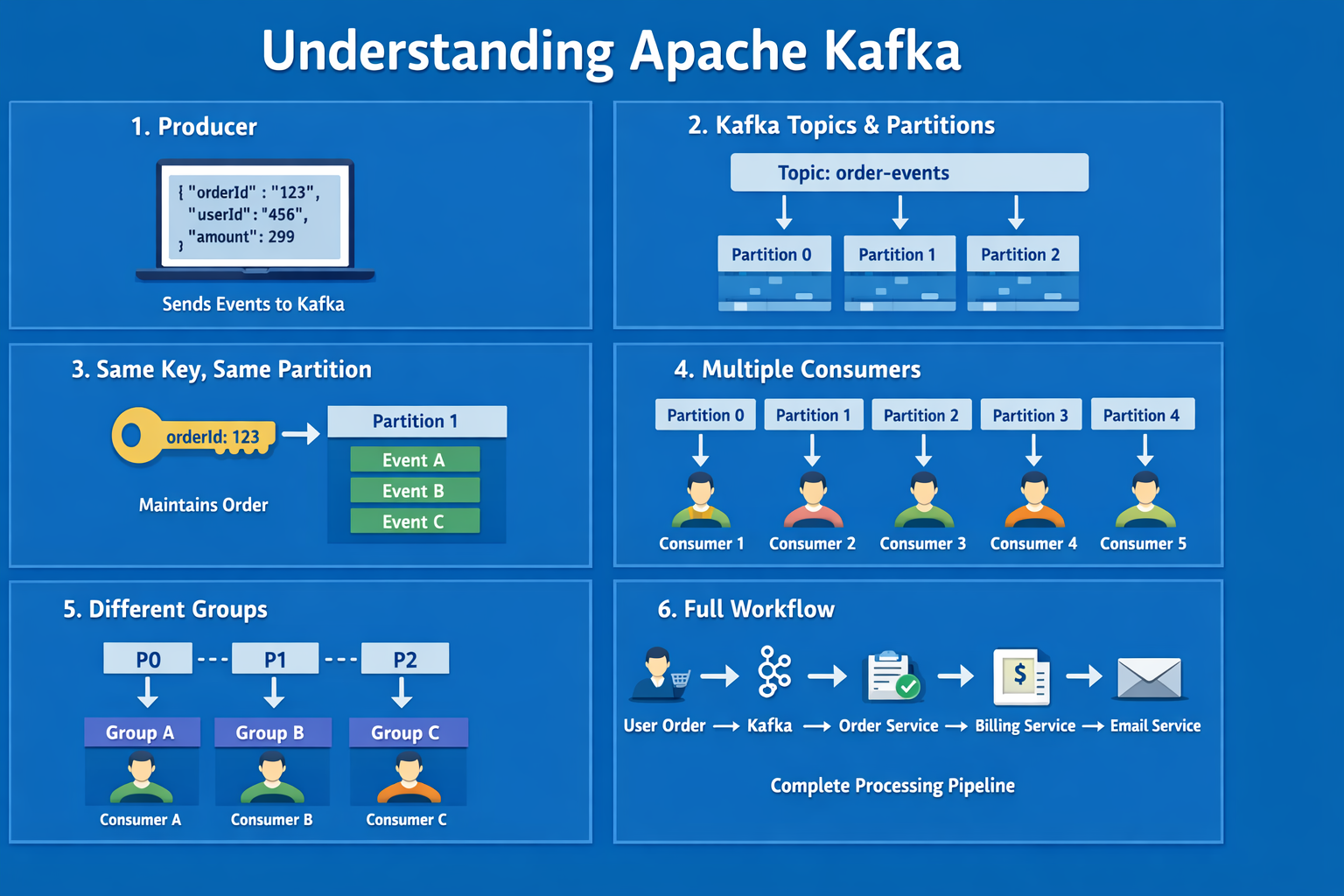
Introduction: The Problem with Success
Imagine your e-commerce application is a massive success. Suddenly, instead of hundreds of users, you have thousands of customers purchasing products simultaneously. That’s a great problem to have, but it’s a technical nightmare for traditional application architecture.
In the early days, when a user placed an order, your code might have looked like a straight line:
-
User clicks “Buy.”
-
The application calls the
processOrder()function. -
Then it calls the
chargeCreditCard()function. -
Then it calls the
sendConfirmationEmail()function.
This synchronous, “one after another” approach works fine when traffic is low. But at scale, if the billing service is slow, the whole checkout process hangs. If the email server is down, the order might fail entirely. Your application becomes brittle and slow.
You cannot rely solely on functions calling other functions sequentially when dealing with high concurrency. You need a way to decouple these processes.
This is where Apache Kafka enters the picture to perform its “concurrent magic.”
What is Apache Kafka?
At its core, Kafka is often described as a message broker, but it is more accurately defined as a distributed event streaming platform.
Think of Kafka as the central nervous system of a large-scale software architecture. Instead of Service A directly talking to Service B (and waiting for a response), Service A simply drops a message (an event) into Kafka and moves on with its life. Service B will pick up that message whenever it is ready.
This decoupling allows your application components to handle massive loads independently without crashing the entire system.
The Mechanics: How Kafka Works
To understand how Kafka handles high traffic, we need to break down its core components.
Producers, Topics, and Partitions
-
Producers: When a user takes an action (like making an order), your application acts as a Producer, pushing an “event” (data) into Kafka.
-
Topics & Partitions: Data in Kafka is organized into Topics (e.g., “NewOrders”). To handle massive loads, topics are split into smaller buckets called Partitions.
-
Keys: A producer can optionally include a Key with the event. Kafka guarantees that all events with the same key will always go to the exact same partition, preserving their order.
Here is how data flows from a producer into partitioned topics in Kafka.
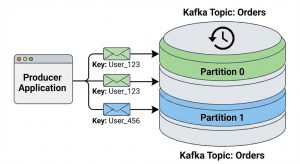
Image 1: Producer pushing data to a partitioned Kafka topic. The key determines the partition, ensuring data for the same entity (like “User_123”) is stored together and in order.
Data Retention
Unlike traditional message queues that delete a message as soon as it’s read, Kafka stores data durably for a configurable period (e.g., 7 days). This allows different services to process the same historical data at different times.
The “Concurrent Magic”: Consumer Groups
This is the most important part of understanding Kafka’s power. How do you read the data out efficiently? You read data using Consumers, organized into Consumer Groups.
Scenario A: Parallelism (Load Balancing)
Goal: Process massive amounts of incoming orders as fast as possible.
If you launch multiple consumers and give them the Same Group ID, Kafka treats them as a single logical unit and automatically balances the partitions among them.
-
True Parallelism: If you have 3 partitions and 3 consumers in the same group, each consumer reads from one partition, achieving maximum parallel efficiency.
-
The Idle Consumer Problem: If you have more consumers than partitions (e.g., 3 partitions and 4 consumers), the extra consumer will sit idle.
To achieve high concurrency, you need enough partitions to support your desired number of parallel consumers.
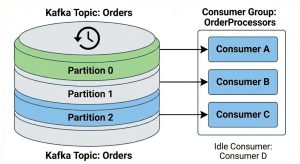
Image 2: Parallelism with a single consumer group. Consumers A, B, and C each handle one partition. Consumer D is idle because there are no more partitions left to assign.
Scenario B: Broadcast (Pub/Sub Model)
Goal: An order comes in, and you want your Billing Service AND your Email Service to see it independently.
If you have multiple consumers with Different Group IDs, Kafka acts as a broadcast or “fan-out” system. Every distinct Consumer Group gets a full copy of all the data in the topic.
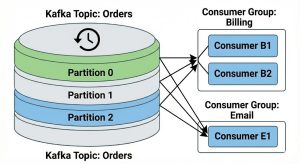
Image 3: Broadcast model with multiple consumer groups. The “Billing” group and the “Email” group each receive a full copy of the data from all partitions, allowing them to process the same events independently.
Summary
Apache Kafka is essential for modern, big-codebase applications. By decoupling your architecture, it allows you to move from fragile, synchronous function calls to robust, asynchronous event streams.
Whether you need true parallelism to crunch massive datasets quickly, or you need to broadcast a single event to multiple different microservices, Kafka’s combination of partitions and consumer groups provides the flexibility to handle the load.